

The jump from one toy store to two is where most owners get blindsided. Not by rent, not by hiring — by the slow drift that happens when the same product lives in two buildings and nobody agreed on which building "owns" the truth.
You open the second location feeling good. Three months later a customer calls asking to hold a Lego set your system says you have twelve of. Turns out you have twelve across both stores — four at one, eight at the other — and the person who answered had no idea which. Meanwhile that same set is priced $2 apart between locations because someone ran a clearance at store A and never told store B.
This is the part of scaling that quietly eats margin. Below is a phased replication plan built specifically for micro-chains — two or three locations — so you don't bolt on enterprise systems you don't need, but you also don't run store #2 like a hobby.
Why micro-chains break in ways single stores never do
A single store forgives sloppiness. If your first store's SKU list is messy — duplicates, inconsistent naming, missing categories — do not replicate that mess. You'll be cleaning it in two places forever.
The moment you add a second building, every informal habit becomes a coordination problem. The failure isn't dramatic. It's a thousand tiny inconsistencies that compound:
-
The same toy carries two different SKUs because each store received it under a separate PO
-
Pricing changes at one store never propagate
-
Transfers happen "off the books" — a manager grabs six units from the other store and texts about it later
-
Reporting becomes two spreadsheets that don't reconcile, so you stop trusting either
None of these feel urgent on day one. That's exactly why they're dangerous. By the time they hurt, you've got months of dirty data to untangle.
The core idea: replicate the system, not just the store
Opening a second location is not "do everything again in a new building." It's replicating a system with one designated source of truth. The physical store is the easy part. The hard part is making sure inventory counts, SKUs, prices, and reports mean the same thing everywhere.
Never run out of bestsellers again.
GoToyvio helps you monitor inventory and sales to keep your shelves stocked and customers happy.
- Real-time stock tracking
- Automated reorder alerts
- Sales and promotion analytics
No credit card required
For a micro-chain, you don't need a warehouse management system or a regional ops team.
-
A master-SKU list that both stores inherit — not create
-
Inter-store transfer rules so stock moves are recorded, not improvised
-
A lightweight reporting cadence that rolls up without becoming a part-time job
-
Owner approval gates on the handful of decisions that cause drift
You need four things locked down before store #2 opens:
Phase 1: Lock the master-SKU list before anything ships to store #2
This is the foundation, and it's the one people skip because it's boring. If your first store's SKU list is messy — duplicates, inconsistent naming, missing categories — do not replicate that mess. You'll be cleaning it in two places forever.
A master-SKU list means one canonical record per product. Store #2 doesn't get to "create" a product record. It inherits the existing one or, for genuinely new items, the item gets added to the master first, then flows down to both stores.
A typical example of how this goes wrong: Store A receives a shipment of a plush line and the receiving clerk types "Squishmallow 12in Axolotl." Store B receives the same product months later and types "SQ Axolotl 12\"." Now you have two SKUs, two velocity histories, two reorder points, and a report that shows half the sales volume on each. Reorder decisions get made on garbage numbers.
If you want the full breakdown on getting SKU hygiene right before you replicate it, we covered the single-store version in depth — treat your POS as a single source of truth and clean the master-SKU list first. Get that clean, then clone it.
Before store #2 opens, your master list should have:
-
One SKU per product, no duplicates
-
A consistent naming convention (brand → line → variant → size)
-
Category tags that both stores use identically
-
A "created at HQ" rule — new items enter the master, not a local list
-
Location-level stock fields, so one SKU can show counts per store
That last point matters more than it sounds. You want one product record with per-location quantities, not two separate product records. This single decision prevents most of the pain that follows.
Phase 2: Write inter-store transfer rules people will actually follow
Once you have two stores, stock will move between them. A customer wants a game store A is out of; store B has three. Someone's going to grab units. The question is whether that movement gets recorded in real time or reconstructed from memory during inventory count.
Untracked transfers are the number one cause of phantom inventory in small chains. A manager pulls four board games from store B to cover a birthday party rush at store A. They mean to log it. The day gets busy. Three weeks later store B's count is off by four, someone assumes shrinkage, and now you're investigating theft that never happened.
-
Any stock leaving one location gets logged before it moves — not after
-
The originating store's count decreases; the receiving store's increases, same transaction
-
Transfers over a set threshold (say 10 units or $200 in value) need a quick owner or manager sign-off
-
Nothing moves on a verbal request — there's a record, even if it's a shared form
The threshold matters more than people expect. You don't want approval friction on moving two units. You do want a gate on someone quietly relocating a third of your hot-release stock before a launch weekend. That's the kind of movement that wrecks allocation — and if you're managing scarce stock, your inventory-allocation rules for small stores should carry over to how you govern transfers too.
Here's a simple transfer workflow you can visualize before writing the rule:
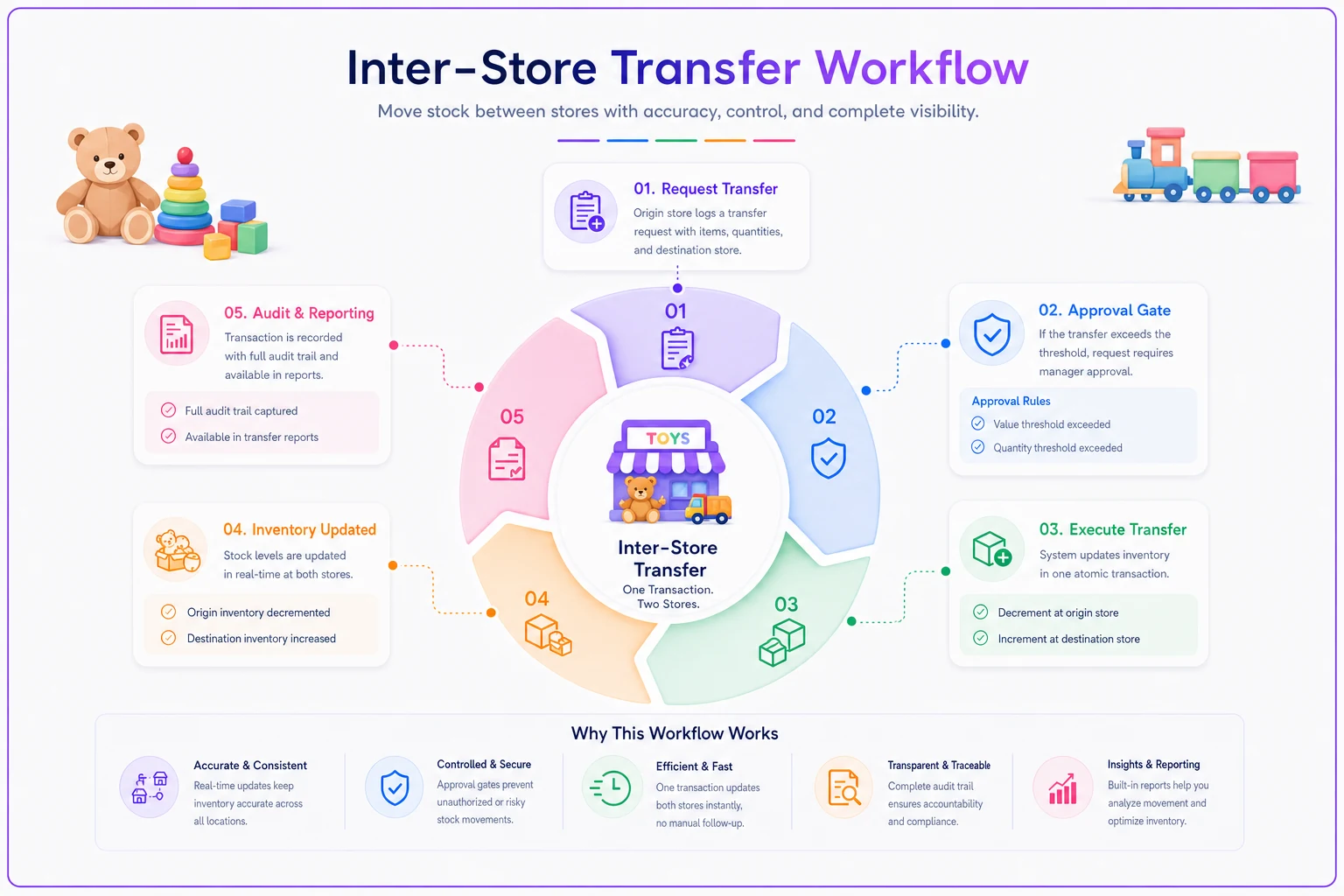
The point isn't bureaucracy. It's that stock movement is visible and traceable. When your monthly count is off, you can see exactly what moved instead of guessing.
| Transfer size | Rule | Who approves |
|---|---|---|
| Under 10 units / under $200 | Log immediately, move freely | Store lead |
| 10–25 units / $200–$500 | Log + manager notified | Store manager |
| Over 25 units or hot-release items | Log + explicit approval before moving | Owner |
The point isn't bureaucracy. It's that stock movement is visible and traceable. When your monthly count is off, you can see exactly what moved instead of guessing.
Phase 3: A reporting cadence that rolls up without eating your week
Two stores means two data streams, and the trap is either drowning in two full report sets or giving up and flying blind. Neither works. What a micro-chain needs is a rolled-up view that answers a handful of questions fast, plus the ability to drill into one store when something looks off.
Keep the cadence lightweight and rhythmic:
-
Daily (2 min) Sales total and any stockouts per store — glance, don't analyze
-
Weekly (15 min) Combined top and bottom sellers, transfers made, any pricing exceptions
-
Monthly (30–45 min) Margin by category per store, reorder review, one-page rollup
The thing most owners miss: you don't need more reporting for a second store, you need consolidated reporting. Running two separate one-pagers side by side hides what you actually care about — how the chain is performing and where the two stores diverge.
Divergence is the signal. If store A sells three times the puzzles store B does, that's either a demographic difference worth stocking to, or a merchandising gap worth fixing. You only spot it when both stores report into the same format. The single-location one-page reporting and governance approach scales cleanly here — same one-pager, just add a location column and a combined row.
Phase 4: Owner approval gates on the four decisions that cause drift
You can't personally review everything across three stores. You also can't let every decision happen locally, or your locations slowly become different businesses. The answer is gating a small, specific set of decisions — the ones that cause chain-wide inconsistency — and leaving everything else to store leads.
The four gates that matter:
-
New SKU creation — goes through the master list, not a local add
-
Price changes and markdowns — one store can't clearance an item the other is selling at full price without a heads-up
-
Large transfers — per the threshold above
-
Reorder points and PAR levels — set centrally, adjusted with sign-off
Pricing is the sneaky one. Store B's manager runs a weekend markdown on slow-moving craft kits. Reasonable call locally. But a customer buys the same kit at store A three days later at full price, sees the other store's clearance online, and now you're issuing a partial refund and looking careless. Multiply that across a busy season and it's a steady drip of goodwill and margin loss.
A pricing gate doesn't mean the owner sets every price. It means price changes are visible and propagate — either the change applies chain-wide, or there's a documented reason it doesn't. Both stores should be able to answer "why is this priced this way here" with something other than a shrug.
A real scenario: two-store toy shop cleaning up before store #3
A family-run toy business with two locations was planning a third. Their symptom list was familiar: phantom inventory from untracked transfers, roughly a dozen duplicate SKUs muddying their reorder data, and pricing that drifted between stores by a couple dollars on maybe 30–40 items at any given time.
Before opening store #3, they spent about three weeks on cleanup. They deduplicated the master list, moved to one product record with per-location counts, and wrote a one-page transfer rule that every lead signed off on. They didn't buy anything fancy — they tightened the system they already had.
The results weren't dramatic overnight, but they were real. Monthly count discrepancies dropped noticeably — the "mystery shrinkage" that turned out to be untracked transfers basically disappeared. Reorder decisions got more accurate because velocity data stopped being split across duplicate SKUs. And when store #3 opened, it inherited a clean list on day one instead of becoming a third source of confusion. They cut their monthly reporting reconciliation time from a couple frustrating hours down to under an hour.
The cleanup work you do before the third store is worth ten times the same work after.
When this phased approach makes sense — and when it doesn't
This makes sense when:
-
You're at two locations and planning a third within a year
-
Stock already moves between your stores informally
-
You're making reorder decisions off data you don't fully trust
-
Your locations are close enough that transfers are routine
This is overkill when:
-
You genuinely run one store with no expansion plans — the single-location governance setup is plenty
-
Your locations are so far apart that transfers never happen and each operates independently (at that point you're running two separate businesses, which is a different playbook entirely)
Who should NOT rush this: If your first store's SKU list and reporting are still a mess, do not open store #2 yet. Replicating a broken system just gives you two broken systems. Fix the source of truth first, then clone it.
Where lightweight software quietly earns its keep
None of this requires enterprise inventory software. But there's a point — usually right around the second location — where spreadsheets and text messages stop holding the whole thing together. Manual transfer logs get skipped. Two reporting files stop reconciling. Someone forgets to propagate a price change.
This is where an operational platform with multi-location support and simple automation starts to earn its keep: one master-SKU list every store reads from, transfers that update both locations' counts in a single action, price changes that either apply chain-wide or flag when they don't, and a rollup report that assembles itself instead of being rebuilt by hand every month. The value isn't the software doing something magic — it's removing the manual steps where drift creeps in.
You don't need it to run one store. You start to feel the absence of it at two, and you'll wish you had it at three.
The takeaway
Scaling a toy store from one location to three isn't about repeating what you did the first time in a new building. It's about replicating a system — a single source of truth, clear transfer rules, consolidated reporting, and a tight set of approval gates on the decisions that cause drift. Do the SKU cleanup before store #2. Write your transfer rules before stock starts moving. Consolidate your reporting instead of duplicating it. Gate the four decisions — SKU creation, pricing, large transfers, reorder points — that quietly pull your locations apart. Get those right early, and store #3 becomes a clean copy instead of a third headache.
Ready to elevate your toy store operations?
Join 500+ toy retailers using GoToyvio to increase sales, reduce stockouts, and enhance customer loyalty.