



Your store shows 12 LEGO Creator sets in stock. A customer drives 30 minutes to buy one. They walk in, you check the shelf—empty. You check the back room—nothing. Your system says 12, but they're all sitting in marketplace fulfillment bins, waiting to ship.
This exact scenario destroys toy stores every December. Not because inventory systems are broken, but because most small retailers never set up proper allocation rules between channels. You end up manually moving stock around, overselling popular items, and watching customers leave empty-handed while the same product sits in a different pile somewhere else.
The allocation problem nobody talks about
Most toy store owners think inventory management means knowing what you have. That's only half the battle. The real challenge is deciding where that inventory should live at any given moment.
-
Physical store
-
Your own website
-
Amazon or eBay
-
Maybe Facebook Marketplace or local delivery
Each channel pulls from the same inventory pool. Without clear rules, you're constantly making reactive decisions. Should those 6 Pokémon tins go to Amazon where they'll sell faster? Keep them for walk-ins? Split them somehow?
What usually happens is chaos. Staff makes different decisions each time. Popular items get oversold. Slow movers pile up in one channel while another channel could move them. Hours every week get spent shuffling inventory around based on gut feelings.
Fixed percentage allocation: the simple framework
After watching toy stores struggle with this, the most effective approach is surprisingly straightforward: fixed percentage allocation with buffer zones.
Never run out of bestsellers again.
GoToyvio helps you monitor inventory and sales to keep your shelves stocked and customers happy.
- Real-time stock tracking
- Automated reorder alerts
- Sales and promotion analytics
No credit card required
Start with your historical sales data. Look at the last 90 days and calculate what percentage of each product category sells through each channel. Rough numbers work fine—don't overthink this.
Let's say you sell board games:
-
60% through your physical store
-
25% through your website
-
15% through Amazon
Those become your baseline allocation percentages. When 20 new Wingspan games arrive, the initial allocation looks like:
-
12 units to store (60%)
-
5 units to website (25%)
-
3 units to Amazon (15%)
But treating these as rigid rules is where most stores mess up. Fixed percentages are your starting point, not your ending point.
Buffer inventory prevents the real problems
Pure percentage allocation fails because sales don't follow neat patterns. You need buffer zones between channels.
The rule that works: keep 15-20% of fast-moving inventory unallocated. This float inventory can swing to whatever channel needs it most.
Using our Wingspan example with 20 units:
-
10 units to store (50% instead of 60%)
-
4 units to website (20% instead of 25%)
-
3 units to Amazon (15% stays the same)
-
3 units in buffer (15%)
That buffer serves three purposes. It covers sudden demand spikes in any channel. It prevents overselling when multiple channels sell simultaneously. It gives you flexibility without constant manual reallocation.
For slower-moving items (less than 2 sales per week), skip the buffer. Allocate everything immediately to prevent inventory from sitting idle.
Automated transfer thresholds that actually work
Manual reallocation kills productivity. You need automatic triggers that move inventory between channels based on actual sales velocity.
Here's a simple threshold system:
-
When any channel drops below 2 units of a fast mover
-
When any channel sits at zero for more than 48 hours
-
When one channel's sales velocity exceeds baseline by 50% for 3 consecutive days
Transfer amounts:
-
Pull from buffer first
-
Then pull from the channel with the slowest velocity
-
Never drop any channel below 1 unit (except when total inventory is less than channel count)
A practical example: You allocated 10 Squishmallows to your store, 5 to website, 3 to Amazon, with 2 in buffer. Store sales spike—you sell 8 in two days. The system automatically:
-
Moves both buffer units to store (now at 4 units)
-
Checks website velocity—only 1 sale in two days
-
Transfers 2 units from website to store
-
Sends reorder alert since total inventory dropped below threshold
This happens automatically. No meetings, no debates, no manual counting.
Real numbers from a working toy store
Let me walk through how this plays out with actual products and sales patterns.
Product: LEGO Star Wars Millennium Falcon (smaller $40 set)
Initial inventory: 24 units
Allocation:
-
Store
12 units (50%)
-
Website
6 units (25%)
-
Amazon
4 units (17%)
-
Buffer
2 units (8%)
Week 1 sales:
-
Store
7 units sold
-
Website
2 units sold
-
Amazon
4 units sold (completely out)
Automatic adjustments:
-
Buffer units immediately go to Amazon
-
System pulls 1 unit from website to Amazon
-
Reorder triggered (13 total units sold = 54% of stock in one week)
Week 2 (after adjustments):
-
Store
5 units (from 12, sold 7)
-
Website
3 units (from 6, sold 2, transferred 1)
-
Amazon
3 units (from 4, sold 4, received 3 transfers)
-
Buffer
0
The system prevented Amazon stockout while maintaining store availability. No manual intervention needed.
Common allocation mistakes that kill profits
Mistake 1: Allocating everything immediately
When inventory arrives, the temptation is to divide it all up right away. This locks you into decisions before you see actual demand patterns. Keep that 15-20% buffer, even if it means showing slightly less availability online.
Mistake 2: Using the same percentages for all products
Puzzles might sell 80% in-store while collectible cards sell 70% online. Don't force every product into the same allocation split. Group products by type and set percentages accordingly:
| Product Type | Store | Website | Marketplace | Buffer |
|---|---|---|---|---|
| Board Games | 55% | 25% | 10% | 10% |
| Building Sets | 50% | 20% | 15% | 15% |
| Collectibles | 30% | 35% | 25% | 10% |
| Puzzles | 70% | 15% | 5% | 10% |
| Action Figures | 45% | 25% | 20% | 10% |
Mistake 3: Ignoring velocity differences between channels
Amazon customers expect fast shipping. Store customers browse. Website buyers research. Each channel has different velocity patterns. Your allocation rules need velocity triggers, not just quantity triggers.
Mistake 4: Manual overrides without documentation
Staff pulls inventory for a special order. Manager moves stock for an event. Nobody updates the system. Suddenly your carefully planned allocations are meaningless. Every manual override needs a system update, or your automation breaks down.
Setting up transfer algorithms for small retailers
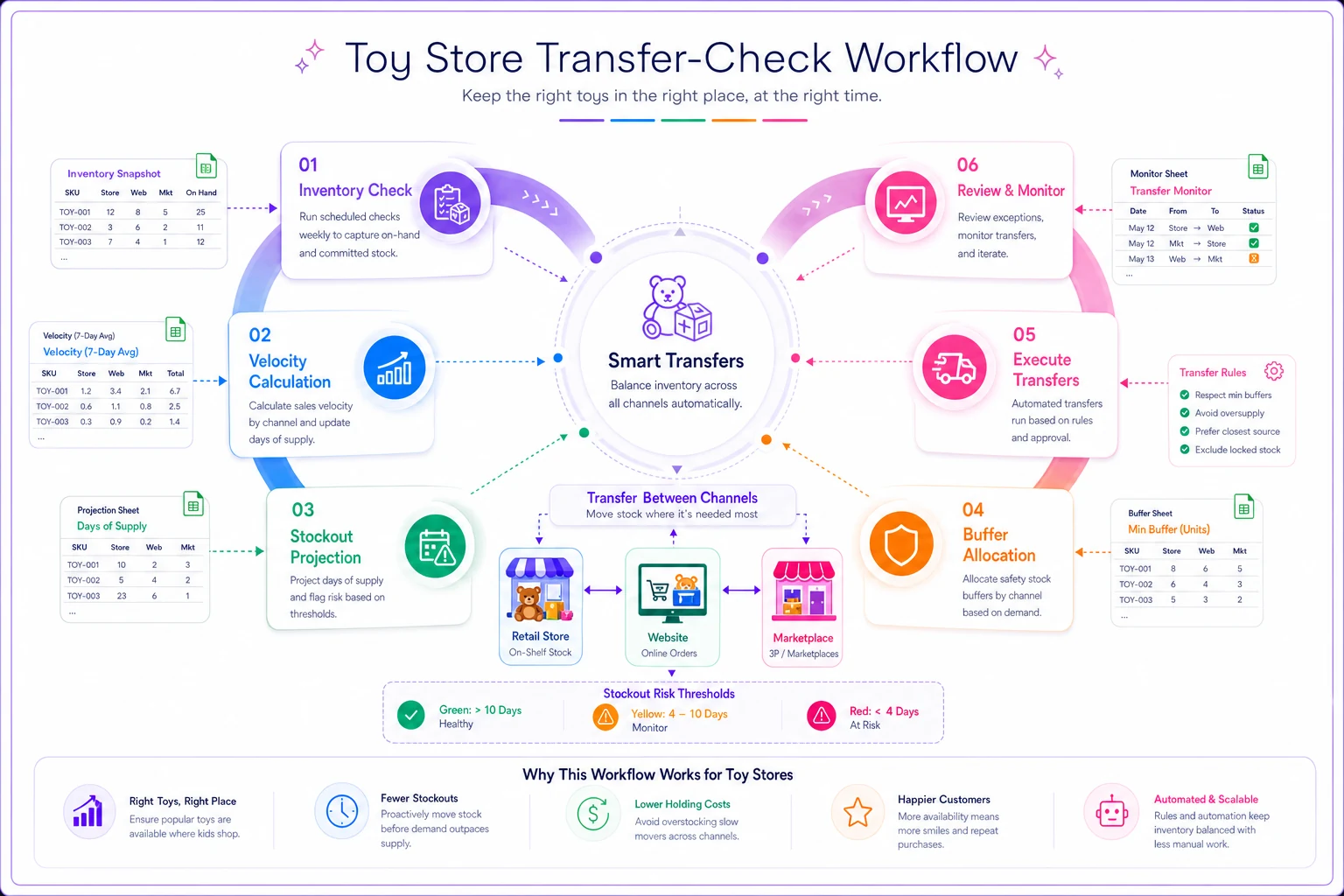
You don't need complex software to automate transfers. A basic spreadsheet with formulas can handle most small toy store needs.
The simplest effective algorithm:
-
Check inventory levels every 4 hours (or at shift changes)
-
Calculate sales velocity
units sold ÷ hours since last check
-
Project stockout time
current inventory ÷ velocity
-
If stockout time < 24 hours, trigger transfer
-
Transfer amount = 3 days of velocity (rounded up)
Here's how this looks in practice:
Below is a visual workflow of the transfer-check process.
Morning check (10 AM):
-
Store Pokémon cards
8 units remaining
-
Sold 3 units since 6 PM yesterday (16 hours)
-
Velocity
3 ÷ 16 = 0.19 units/hour
-
Projected stockout
8 ÷ 0.19 = 42 hours
-
No transfer needed
Afternoon check (2 PM):
-
Store Pokémon cards
3 units remaining
-
Sold 5 units since 10 AM (4 hours)
-
Velocity
5 ÷ 4 = 1.25 units/hour
-
Projected stockout
3 ÷ 1.25 = 2.4 hours
-
Transfer triggered
-
Transfer amount
1.25 × 12 hours (half day) = 15 units
-
Available from buffer
2 units
-
Pull from website
8 units
-
Pull from Amazon
5 units
The math keeps you from both extremes—panicking over normal sales and ignoring genuine stockout risks.
When to break your own allocation rules
Rules exist to prevent chaos, but sometimes breaking them makes sense.
Break rules for events:
School fundraiser wants 50 board games? Pull from all channels. Document the override and adjust next month's percentages based on what you learn.
Break rules for seasonal shifts:
December in-store traffic triples? Shift allocation to 70% store, 20% website, 10% marketplace for the season. Don't try to maintain normal percentages during abnormal periods.
Break rules for dead inventory:
Product not moving in-store for 30+ days? Push it all online where different customers might bite. Physical shelf space costs more than digital listings.
Break rules for exclusive deals:
Got exclusive rights to a hot product in your area? Keep 90% for store customers who can't get it elsewhere. Use that advantage.
The key: breaking rules should be intentional, documented, and temporary.
Tools and systems that handle this automatically
Manual allocation management burns 5-10 hours weekly in most toy stores. That's time you could spend on customer service, marketing, or literally anything more valuable than counting and moving inventory.
Spreadsheets work initially but break down around 200+ SKUs or 50+ daily orders. At that point, the manual updates eat up any efficiency gains from having rules.
Modern inventory platforms can handle allocation automatically. They track sales velocity across channels, move inventory based on your rules, and prevent oversells by maintaining buffer zones. The good ones even learn from your seasonal patterns and adjust allocations accordingly.
The operational difference is dramatic. Instead of morning inventory meetings, staff starts selling immediately. Instead of weekend inventory shuffling, you're planning next quarter's purchases. Instead of apologizing for stockouts, you're fulfilling orders from the right channel automatically.
Making allocation rules work in your store
Start simple. Pick your 10 best-selling products and set up basic allocation rules:
-
Calculate last month's channel percentages
-
Set up initial allocations with 15% buffers
-
Track daily for one week
-
Adjust percentages based on actual velocity
-
Add transfer triggers for stockout prevention
-
Expand to next 20 products
Don't overthink the percentages. Being roughly right beats being precisely wrong. A 45/25/20/10 split works just as well as 47.3/24.1/19.6/9.0.
The biggest implementation challenge isn't technical—it's behavioral. Staff needs to trust the system instead of making gut-feeling adjustments. That trust comes from seeing it work. Start with products where mistakes won't hurt much, build confidence, then expand.
Start with products where mistakes won't hurt much to build staff confidence.
Track these numbers weekly:
-
Stockouts by channel
-
Manual override frequency
-
Time spent on reallocation
-
Oversell incidents
-
Buffer utilization rate
After 30 days, you'll see patterns. Maybe buffers are too big for slow movers. Maybe transfer triggers fire too early for seasonal items. Adjust accordingly, but resist the urge to constantly tinker. Let the system run for at least two weeks before making changes.
Conclusion
Inventory allocation isn't about perfect optimization—it's about preventing the problems that kill toy stores. Customers walking away empty-handed. Overselling during peak season. Staff wasting hours on manual shuffling.
Fixed percentage allocation with buffers solves 80% of these problems. Add velocity-based transfers and you've covered 95%. The last 5% isn't worth chasing—that complexity creates more problems than it solves.
The stores thriving with multi-channel sales aren't the ones with perfect systems. They're the ones with simple, clear rules that everyone follows. They prevent stockouts without overstocking. They fulfill from the right channel without constant manual intervention. They spend time selling toys, not counting them.
Your allocation system should free you from inventory Tetris, not create more complexity. Start with the framework outlined here, adjust based on your actual sales patterns, and automate the repetitive decisions. Within a month, you'll wonder how you ever managed without clear allocation rules.
Ready to elevate your toy store operations?
Join 500+ toy retailers using GoToyvio to increase sales, reduce stockouts, and enhance customer loyalty.