

Most toy stores don't have a "tech problem." They have a governance problem that only shows up as a tech problem when something breaks — usually at the worst possible time, like a Saturday in December when your online inventory says you have 12 units of a hot release and the shelf has zero.
Nobody tells small retailers this: the moment you connect your POS to a website, a marketplace, an email tool, and maybe an accounting package, you've quietly become the person responsible for how data flows between all of them. Nobody signed up for that. But if you don't put a few lightweight rules in place, your systems will slowly drift out of agreement with each other, and you'll spend your weekends playing detective.
This article is about retail tech governance for small retailers — specifically the boring-but-critical stuff that keeps your data honest: simple data contracts, sync-cadence rules, dry-run tests before you flip anything live, and knowing when to walk away from a vendor. None of this requires an engineer. It requires discipline and about four one-page documents.
Why your systems drift apart in the first place
Every integration between two tools is a quiet agreement: "I'll send you data in this shape, and you'll accept it." That agreement is almost never written down. It lives in someone's head, or in the default settings of whatever app you installed.
Then reality happens. A supplier changes how they code sizes. You add a new field for "collector edition." A marketplace decides SKUs can't contain slashes anymore. Each little change is harmless on its own. Stacked together over 18 months, they turn your product catalog into a swamp where the same toy exists three different ways across three systems.
The drift is never caused by one big failure. It's death by a hundred tiny mismatches. Your POS calls it LEGO-CITY-60380, your website calls it legocity60380, and your marketplace listing just says 60380. A human can tell those are the same product. Your inventory sync cannot. So it either duplicates the item or silently drops the update — and now your counts are wrong.
This is exactly why getting your POS to act as a single source of truth matters so much. But even a clean POS won't save you if the connections between systems have no rules. That's what governance actually is: the rules for the connections.
The four documents that prevent most of the chaos
You don't need a policy binder. You need four short reference sheets that live in a shared folder and get updated when things change.
Never run out of bestsellers again.
GoToyvio helps you monitor inventory and sales to keep your shelves stocked and customers happy.
- Real-time stock tracking
- Automated reorder alerts
- Sales and promotion analytics
No credit card required
| Document | What it does | How often you touch it |
|---|---|---|
| Data contracts (SKU, customer, order) | Defines the exact shape and rules for your three core record types | When you add a field or change a format |
| Sync-cadence rules | Decides which data updates in real time vs. hourly vs. daily | Quarterly review, or when you add a channel |
| Dry-run test checklist | The steps you run before any integration goes live | Every time you connect or reconfigure a tool |
| Vendor-exit triggers | The pre-agreed conditions that mean "we're leaving this vendor" | Set once, review yearly |
The magic isn't in any single sheet. Together they cover the full lifecycle of an integration: how data should look, how fast it moves, how you test it, and how you get out. Miss any one and you've left a gap where problems hide.
Data contracts, sized for a team of three
Forget the enterprise version of a "data contract." For a toy store it's just a plain-language definition of what a valid record looks like — for your three most important record types: SKU, customer, and order.
Here's what a lightweight SKU contract actually contains:
-
SKU format rule — e.g. "uppercase letters, numbers, and hyphens only. No spaces, no slashes, no special characters. Max 20 characters."
-
Required fields — title, brand, category, age range, cost, retail price, barcode. If any of these are blank, the record is invalid and shouldn't sync.
-
Age range format — pick one and enforce it. "3-5" not "3 to 5" not "Ages 3+". This one field causes an absurd amount of merchandising and filtering pain when it's inconsistent.
-
Category values — a fixed list. Not free text. The moment staff can type a category, you'll get "Puzzles," "puzzle," and "Puzzels" all in the same system.
The customer contract is similar but shorter: what makes a customer record valid, which fields are required at checkout, and how consent is recorded. If you've been running customer-data micro-audits, the contract is just the written version of the standard you're already auditing against.
The order contract defines what a complete order looks like across channels: order ID format, required line-item fields, how you tag the fulfillment channel (in-store, ship, pickup), and how refunds get represented. This one prevents the classic mess where online orders and in-store orders can't be compared because they're structured differently.
Worth noting: stores that write these three contracts down almost always discover that two of their systems already disagree the moment they compare actual data to the contract. That discovery alone is worth the afternoon it takes.
Sync-cadence: not everything needs to be real-time
This is where a lot of small retailers overspend on complexity. The instinct is "sync everything instantly." But real-time sync is more fragile, more expensive, and more prone to weird race conditions than most stores actually need.
The better approach is to decide cadence per data type based on one question: what's the cost of this being wrong for an hour?
-
Inventory counts on fast-moving or limited items → as close to real-time as your tools allow. The cost of overselling a hot release is a refund, an angry email, and a burned collector relationship.
-
Inventory counts on slow, deep-stock items → hourly is fine. If you have 40 of a staple puzzle, a 45-minute delay isn't hurting anyone.
-
New product / catalog updates → daily batch. You almost never need a new SKU live within minutes.
-
Customer and marketing data → daily is plenty. Consent changes should move quickly, but a birthday tag doesn't need to sync in real time.
-
Financial/order data to accounting → daily, end-of-day. Real-time accounting sync mostly just creates reconciliation noise.
If you're unsure, default catalog changes to daily batches to reduce incidental errors while you refine cadence rules.
The mistake almost everyone makes is treating cadence as a technical setting instead of a business decision. It's not "how fast can the API go." It's "how much does a stale number cost me here." Once you frame it that way, most stores realize they can run hourly or daily on the majority of their data and reserve real-time only for where oversells actually hurt.
When real-time sync is a bad idea
If you're running preorders through a system that isn't rock-solid, real-time inventory sync can create a nasty feedback loop where a preorder decrements available stock, triggers a reorder alert, and confuses your allocation logic all at once. A controlled hourly batch with clear buffer rules is calmer and more predictable. Slower and correct beats fast and wrong.
Dry-run tests: never flip an integration live blind
The most avoidable disaster in small-retailer tech is turning on a new integration during business hours and finding out live whether it works. It usually doesn't, not the first time — and now you're debugging with real customers and real inventory on the line.
A dry-run is exactly what it sounds like: you run the integration in a safe, reversible way before you trust it with your full catalog. A practical checklist for a small store:
-
Pick a test set of 10–15 SKUs that cover your edge cases
one long title, one with an accent character, one bundle, one limited-edition, one with zero stock, one on preorder.
-
Run the sync on just those SKUs (most tools let you filter, or you can use a staging/sandbox mode).
-
Compare both sides field-by-field. Does the title match? Did the age range survive? Did the price round correctly? Did the SKU format hold?
-
Deliberately break something. Enter an invalid SKU and confirm the system rejects it instead of silently syncing garbage.
-
Test a refund and a partial refund. Refund handling is where order data most often falls apart across channels.
-
Check timing. Note how long the sync actually takes so your cadence expectations are realistic.
Only after all of that passes do you scale to the full catalog. It's the same logic behind a solid receiving and QC process — inspect a sample carefully before you let anything into the system that everything else depends on. Your data deserves the same time-boxed inspection your physical stock gets.
Stores that skip dry-runs aren't lazy — they're optimistic. They assume vendor integrations just work. Some do. The ones that don't tend to fail silently, corrupting a few hundred records before anyone notices. A 30-minute dry-run is cheap insurance against a two-day cleanup.
Vendor-exit triggers: decide the breakup rules before you're already frustrated
A scenario that plays out constantly: a store adopts an inventory or e-commerce tool, it works fine for a year, then support gets slow, prices go up, and a key feature breaks. The store knows it should switch. But switching feels massive, so they limp along for another year or more, quietly bleeding time and sales.
The fix is to decide your exit conditions before you're emotionally invested. Write down the specific triggers that mean "start migrating." Because in the moment, you'll always find a reason to stay.
-
Data export is blocked or crippled. If you can't get a clean, complete export of your SKUs, customers, and orders on demand, that's a red flag before you even sign on. If a vendor removes or degrades export access later, that's an immediate trigger.
-
Two or more critical outages during peak season. One is bad luck. A pattern during Q4 is a business risk you can't carry.
-
A core feature you rely on gets removed or paywalled into a tier that doesn't make sense for your revenue.
-
Support response time consistently exceeds what you can operate with — for most stores, that's anything past 48 hours on something that blocks selling.
-
Price increases that outpace the value — a jump that isn't matched by features you'll actually use.
The most important exit trigger is the data-portability one, and it should be checked before you adopt a tool, not after. If you can't easily get your data out, you don't have a vendor — you have a landlord. Ask for a sample export during your trial. If they can't produce one, walk.
How this all connects as you grow
At one location, you can survive a lot of sloppiness through familiarity — you know which SKU is really which, you eyeball the counts, you catch problems by instinct. Governance feels optional.
The moment you add a second channel or a second location, that instinct stops scaling. The person receiving stock isn't the person who set up the product. The website isn't updated by the same hands that ring up sales. The undocumented agreement that lived in someone's head breaks the instant more than one head is involved.
The workflow that holds up as you grow: a new product gets created once, in the system that owns product data (usually your POS), following the SKU contract. From there it flows outward on the cadence you defined — inventory near-real-time where it matters, catalog updates in the daily batch. Any new integration gets dry-run tested on a sample before it touches the full catalog. Every vendor has a written exit trigger so you're never trapped.
Here's a simple workflow visualization.
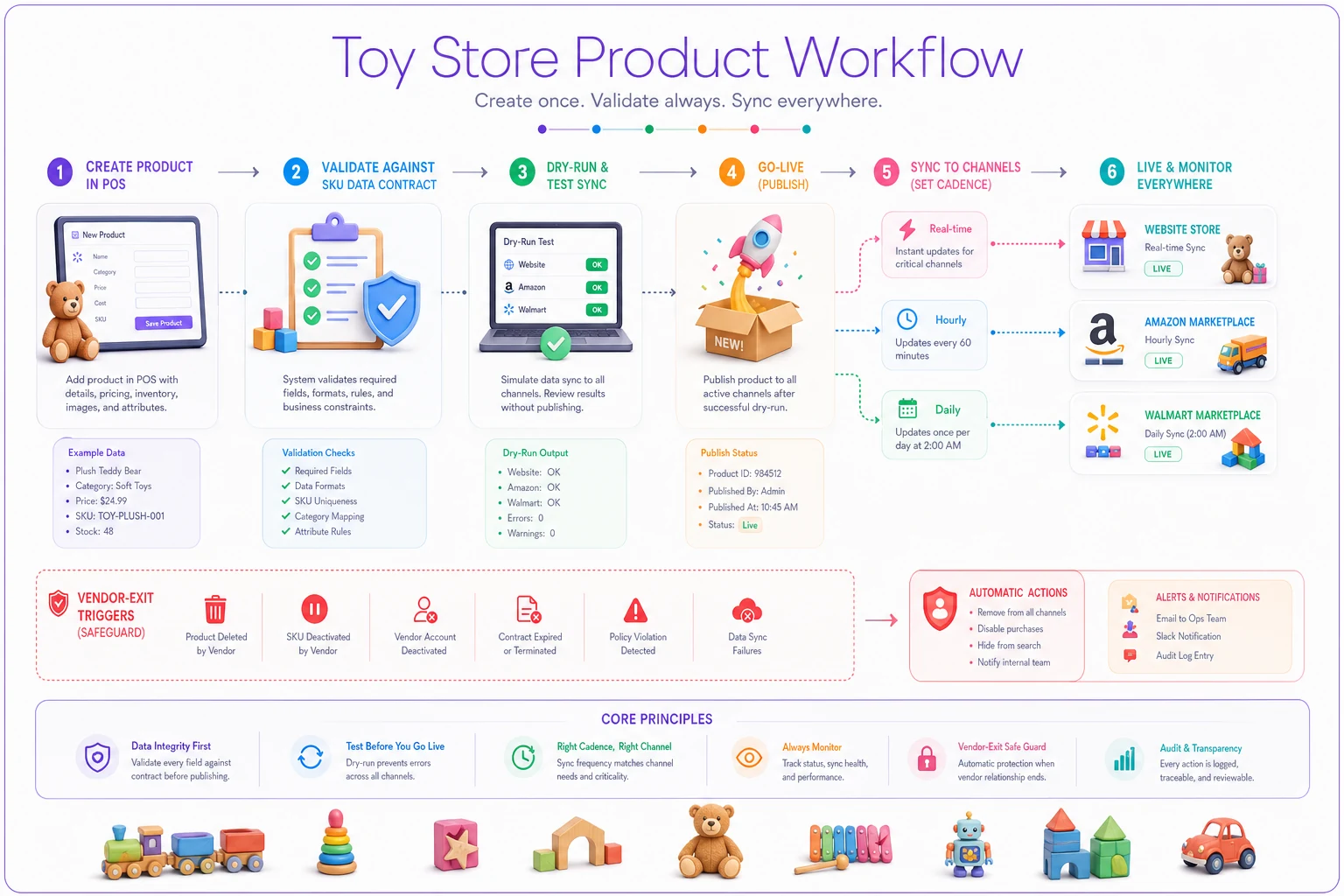
This is where lightweight operational software earns its place — not as a magic fix, but as the thing that enforces your contracts automatically. Good platforms let you set required fields, lock category lists, validate SKU formats on entry, and schedule sync cadence per data type instead of relying on staff to remember the rules. The rules are still yours. The software just stops people from breaking them at 4pm on a busy Saturday. That's the honest role of automation here: it makes your governance stick.
A real scenario
A single-location store carrying a mix of everyday toys and collectibles connected their POS to a new webstore and a marketplace, all at once, right before the holidays. No contracts, no dry-run. Within a few weeks they were dealing with roughly 15–20% of their online catalog showing wrong stock, a handful of oversells on a limited release, and duplicate listings where SKU formats didn't match.
They spent most of a slow January cleaning it up. Then they did the boring work: wrote a one-page SKU contract, standardized age-range and category formats, set inventory to near-real-time only on limited and fast movers while everything else ran hourly, and built a 12-SKU dry-run checklist for any future changes.
The next time they added a channel, the dry-run caught two format problems before go-live — an accented product title that broke, and a bundle that synced as separate items. Fixed in under an hour instead of over a weekend. Oversells on the following limited release dropped to near zero. Nothing dramatic. Just far fewer fires and a lot more trust in their own numbers.
Where to start this week
If all of this feels like a lot, don't try to do it at once. Start with the sheet that prevents the most pain: the SKU data contract. Write down your format rule, your required fields, and your fixed category and age-range lists. Then compare your actual data to it — you'll immediately see where your systems disagree.
From there, add the sync-cadence decisions (one afternoon), then the dry-run checklist (you'll use it the next time you touch a tool), then the vendor-exit triggers (a 20-minute conversation with yourself). Four short documents. No engineer required.
Governance isn't the exciting part of running a toy store. But it's the difference between technology that works for you and technology that turns every busy season into a guessing game about which number to trust.
Ready to elevate your toy store operations?
Join 500+ toy retailers using GoToyvio to increase sales, reduce stockouts, and enhance customer loyalty.