
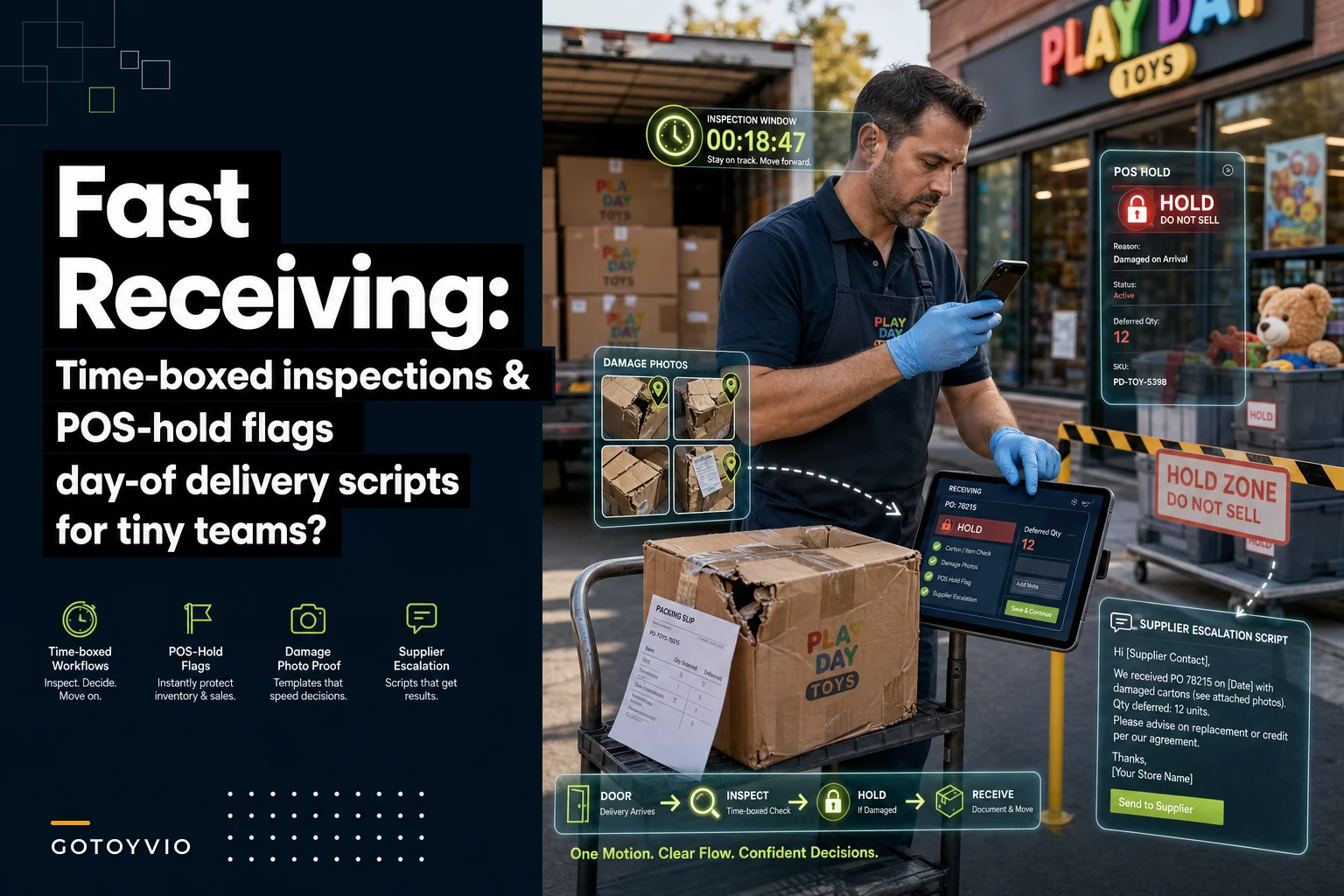

The freight truck shows up at 2:40pm on a Saturday. You've got a birthday party crowd at the register, a phone ringing about a preorder, and now four cartons of restock plus a pallet of the new building-block sets sitting by the back door. So you do what almost every tiny toy store does: you sign for it, shove the boxes into the stockroom, and promise yourself you'll "check it properly later."
Later never comes the way you want it to. That's the whole problem.
This post is about one narrow thing: the receiving inspection SOP retail teams actually need when there are only one or two people working. Not a warehouse process. Not a six-station QC line. A time-boxed, realistic way to catch damage, shortages, and wrong SKUs on the day of delivery so they don't turn into fulfillment headaches two weeks from now.
The specific failure: "receive now, inspect never"
Here's how it actually plays out. A box comes in marked as 12 units of a plush line. You're slammed, so you count cartons — four, looks right — and sign the delivery slip. Paperwork says everything's there.
Three days later someone orders that plush online for pickup. Your POS says you have 12. You go to grab one and find the carton actually held 9, plus two with crushed boxes you can't sell at full price. Now you're issuing a refund or a substitution, apologizing to a customer, and emailing a supplier about a shortage that happened 72 hours ago with zero photos and a fuzzy memory.
The root issue isn't laziness. It's that the moment you sign, your POS and your reality quietly disconnect, and nobody has time to reconcile them during a busy shift. On a two-person team, "inspect thoroughly right now" competes directly with "serve the customer standing in front of me," and the customer always wins. As it should.
So the fix isn't "inspect everything immediately." It's designing your receiving process so that a fast pass protects you, and a deferred pass finishes the job — without any inventory going live in a broken state.
The core idea: time-box it, and never let unverified stock go sellable
Two rules do most of the heavy lifting here.
Never run out of bestsellers again.
GoToyvio helps you monitor inventory and sales to keep your shelves stocked and customers happy.
- Real-time stock tracking
- Automated reorder alerts
- Sales and promotion analytics
No credit card required
Rule one: cap the on-arrival inspection at a fixed time. For a typical toy-store delivery — a handful of cartons, maybe a pallet during Q4 — somewhere in the 3 to 7 minute range at the truck or back door is realistic. That's it. You're not doing a full unit count. You're doing a triage pass.
Rule two: nothing you haven't verified is allowed to show up as sellable in your POS. This is the part most stores skip. If stock is received but not yet fully checked, it needs to sit in a hold state so it can't be promised to an online order or a pickup. The whole reason day-of damage becomes downstream pain is that unverified inventory gets treated as real inventory.
If you've already worked through simple inventory-allocation rules, this is the receiving-side companion to that. Allocation rules stop you from over-promising what you have; hold flags stop you from promising what you think you have but haven't confirmed yet.
The 3-minute triage pass (what to actually do at the truck)
This is the fast, standing-at-the-back-door version. Do this before you sign anything.
-
Count cartons against the packing slip. Not units — cartons. Takes about 20 seconds and catches the biggest category of loss: a whole missing box.
-
Scan every carton exterior for damage. Crushed corners, water stains, a rattling box that shouldn't rattle, retape marks where the original tape got replaced.
-
Photograph anything questionable before it moves. Non-negotiable, takes seconds. A photo of a crushed carton still on the truck or next to the driver's paperwork is worth ten emails later.
-
Note damage on the delivery receipt before signing. Write "2 cartons crushed — photographed" on the slip. Signing clean means you accepted it clean, and most carrier and supplier claims die right there.
-
Move everything into a designated HOLD zone — not the shelf, not the sellable stockroom.
That's the whole on-arrival job. You're back on the floor in a few minutes and you haven't accepted anything blind.
The insight most owners miss: carton-level checks catch the expensive problems, unit-level checks catch the annoying ones. A missing carton is 12 units of loss; a dented box is one. When you're time-boxed, the carton pass always comes first.
Damage-photo templates: stop taking useless photos
Everyone "takes a photo." Then the claim gets rejected because it shows a dented box against a wall with no context, no label, no packing slip in frame. A photo template is just a fixed shot list so anyone on your team captures what actually supports a claim.
Keep it taped inside the receiving door. Four shots, every time there's damage:
-
The damage close-up — the actual dent, tear, or crush.
-
The full carton with the shipping label visible — proves which box.
-
The carton next to the packing slip or delivery receipt — ties it to this delivery, this date.
-
The contents, if opened — the actual broken or damaged units inside.
For a small toy store, the difference between a template and "just take some pics" is roughly the difference between getting a $60–$140 credit approved and eating the loss. Suppliers and carriers reject vague claims by default because most retailers document badly. Consistent, complete photos flip that.
One thing worth noting: the stores that recover the most on damage claims aren't the ones with the least damage — they're the ones whose documentation always looks the same. Predictability reads as legitimacy.
POS hold flags: the piece that actually prevents downstream pain
When stock lands in the HOLD zone, it needs a corresponding state in your POS or inventory system so it can't be sold or promised.
You've got a few ways to do this depending on your setup:
| Method | How it works | Best for |
|---|---|---|
| Separate "Receiving Hold" location | Stock is received into a non-sellable location, moved to "sellable" only after verification | Systems with multi-location inventory |
| Zero-then-adjust | Don't increment on-hand until verified; keep a paper/notes count in the interim | Very small stores, simple POS |
| Hold tag / status field | Product carries a "hold" status that blocks online/pickup fulfillment | POS with status flags or fulfillment gating |
| Manual "do not sell online" toggle | Turn off ecommerce availability until checked | Stores where damage risk is mostly online-order-driven |
The principle across all of them is the same: on-hand quantity should reflect what you've verified, not what the packing slip claims. The packing slip is a supplier's promise. Your POS should hold your confirmed truth.
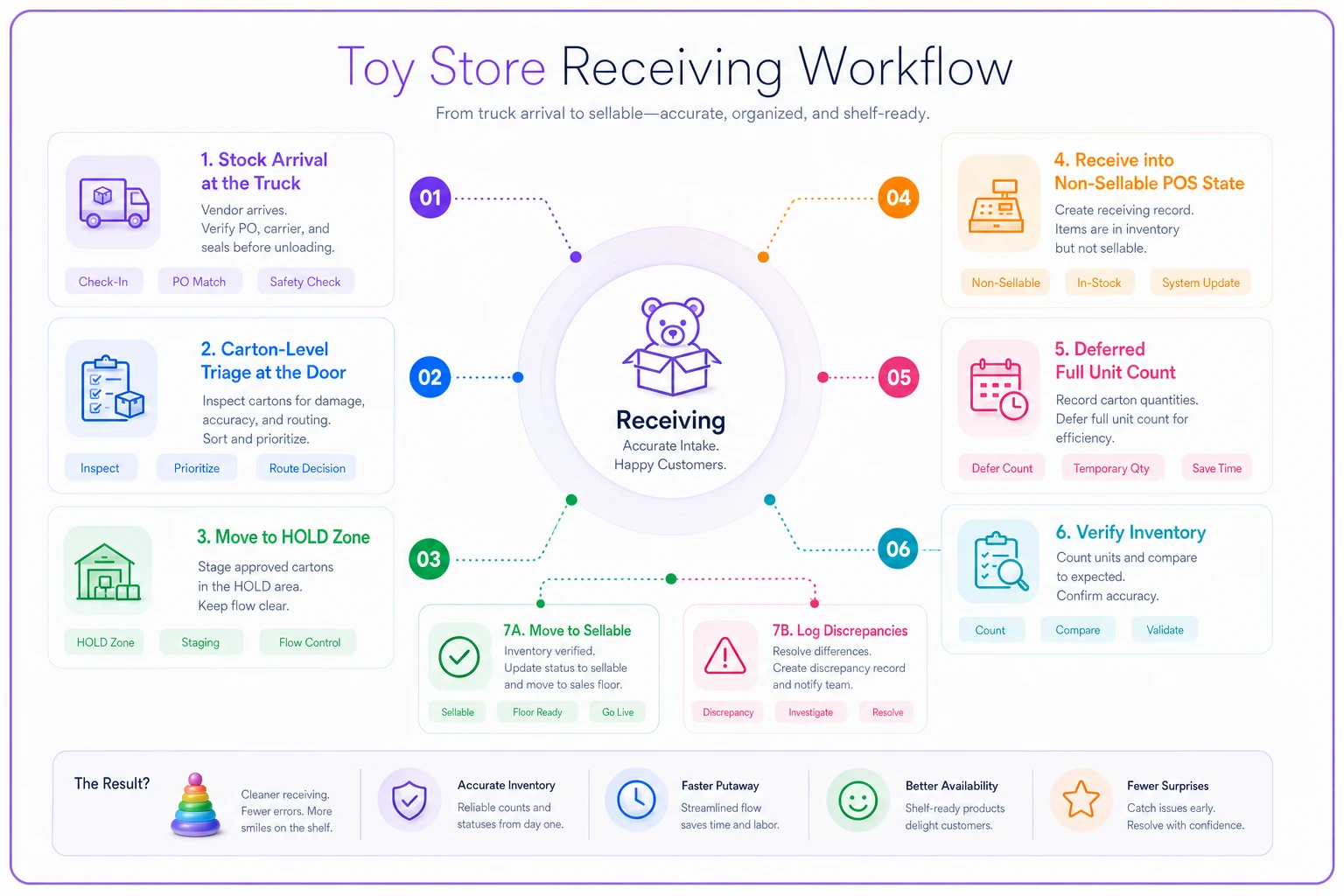
The workflow in plain terms goes like this: stock arrives → goes to HOLD zone and gets received into a non-sellable state → within your deferred window (end of shift or next morning) you do the full unit count → verified units move to sellable, discrepancies get logged, damaged units get pulled → now the inventory is live. At no point could a customer buy something you didn't actually have.
Here's the receiving workflow at a glance.
This matters especially for online and pickup orders. An in-store customer sees an empty shelf and self-corrects. An online buyer trusts your number completely. Every oversell traces back to a number your system believed but couldn't back up. Hold flags close that gap at the source. It's the same logic behind building a seasonal inventory system that protects cash — during Q4 you're receiving constantly, and unverified stock going live is exactly when oversells spike.
Supplier escalation scripts: fix it in 48 hours or lose the claim
Damage and shortage claims have a short window. Most supplier and carrier policies want notice within 48–72 hours. Miss it and you're absorbing the loss. The problem for tiny teams isn't the deadline — it's that writing the email feels like a whole task, so it slides.
Pre-written scripts remove that friction. You fill in blanks and send. Keep three.
> Subject: Shortage on PO [#] — delivered [date] > We received PO [#] on [date]. Packing slip states [X] units of [SKU/description]; actual received was [Y]. Shortage of [Z] units. Cartons were counted at delivery and the discrepancy noted. Please advise on credit or reship. Photos of packing slip and received cartons attached.
> Subject: Damage claim — PO [#], delivered [date] > [N] cartons of PO [#] arrived damaged on [date]; damage was noted on the delivery receipt at time of signing. [Q] units unsellable. Photos attached (carton exterior, shipping label, contents). Requesting credit for damaged units. Please confirm return/disposal instructions.
> Subject: Wrong item received — PO [#] > PO [#] ordered [SKU/description]; we received [wrong SKU/description] instead, quantity [X]. Photos of received item and label attached. Please advise on corrected shipment and return.
Scripts beat "I'll write it later" for a reason that's more emotional than logistical. A blank email invites procrastination. A template with three fields to fill in just asks you to finish it. On a two-person team, that difference is basically everything.
A real scenario
A single-owner toy store doing somewhere around $40k–$50k a month in revenue was quietly eating shortages and damage all through the fall. No formal receiving process — sign, stack, sell. Over a typical few-month stretch they'd lose track of 8–12 discrepancies, most caught too late to claim, and had recurring oversells on online pickup orders during the holiday rush that produced a cluster of apologetic refunds.
They added the boring version of everything above: a taped-up 3-minute triage checklist, a HOLD shelf, a "receiving hold" location in their POS so nothing went sellable unverified, the four-shot photo template, and three escalation scripts saved as email drafts.
The results weren't dramatic, but they were real. Damage and shortage claims that actually got filed and credited went from a small fraction to nearly all of them — recovering a few hundred dollars over the season that used to just disappear. More importantly, the holiday oversells basically stopped, because stock couldn't go live before it was counted. The owner described it less as "saving money" and more as "not spending Sunday afternoons apologizing."
When this makes sense — and when it's overkill
Do this if: you sell online or offer pickup, you receive frequently during a season, or you've had even a couple of "the system said we had it" moments.
Scale it down if: you're a very low-volume store receiving one small box a week from a single reliable local distributor. The HOLD zone can literally be one shelf and the hold flag can be a sticky note — your throughput doesn't justify system states.
Skip the heavy version if you don't sell online at all and your shelf is your source of truth. The photo templates and escalation scripts still pay off regardless — those help any store recover money — but the POS hold mechanics matter most when a number is making promises on your behalf.
The quick-start checklist
Getting this off the ground doesn't require much setup time — most stores can have the basics in place within an afternoon. The goal is to make the right steps the default steps, not something people have to remember under pressure.
-
- [ ] Tape a 3-minute triage checklist inside the receiving door
-
- [ ] Designate one physical HOLD zone that is never "sellable"
-
- [ ] Create a non-sellable receiving state in your POS (location, status, or toggle)
-
- [ ] Set your time-box
cartons + damage scan before signing, full unit count within one shift
-
- [ ] Print the four-shot photo template and keep it where you receive
-
- [ ] Save the three escalation scripts as email drafts, ready to fill in
-
- [ ] Pick your deferred-count window (end of shift or next morning) and stick to it
-
- [ ] Only move stock to sellable after the full count clears
Once it's in place, running through this takes a few minutes per delivery. That's a reasonable trade for not eating a shortage or fielding an oversell complaint at 9pm on a Tuesday.
Where lightweight tooling helps
You can run all of this on paper, and plenty of stores do. The point where it starts to strain is the POS side — remembering to hold, remembering to release, keeping the hold state honest during a chaotic week.
That's where having your inventory or operations software handle it actually pays off: a receiving state that blocks fulfillment until you confirm, a nudge when held stock has been sitting uncounted too long, and photo or discrepancy notes attached to the receiving record so a claim isn't a scavenger hunt later. The manual SOP protects you today; software just makes it harder to skip the steps when things get busy.
The day-of moment is the only moment you have full leverage. The driver is there, the carton is intact evidence, the claim window is open, and your inventory hasn't lied to a customer yet. A receiving SOP you can actually run in a few minutes exists to protect that window — so a rushed Saturday signature doesn't turn into a refund, an oversell, and a lost supplier credit three weeks down the line.
The day-of moment is the only moment you have full leverage. The driver is there, the carton is intact evidence, the claim window is open, and your inventory hasn't lied to a customer yet. A receiving SOP you can actually run in a few minutes exists to protect that window — so a rushed Saturday signature doesn't turn into a refund, an oversell, and a lost supplier credit three weeks down the line.
Ready to elevate your toy store operations?
Join 500+ toy retailers using GoToyvio to increase sales, reduce stockouts, and enhance customer loyalty.