



If you're running marketing for a single toy store, your "customer database" is probably your POS. Square, Lightspeed, Shopify POS, whatever. And that database is quietly rotting.
Not dramatically. Just a little every week. A cashier types a birthday as 07/07/2015 for one kid and 2015-07-07 for another. A staff member checks "email opt-in" on someone who mumbled "no thanks." A regular family shows up under three different phone numbers because three different adults paid. Nobody notices because nothing breaks today. Then in November you pull a birthday list for your December club promo and half of it is garbage.
Customer data hygiene in retail doesn't fail in one big collapse. It erodes. And the fix isn't a CRM migration or some six-month project — it's a 20-minute weekly check on your POS export, a handful of correction scripts, and clear rules about who fixes what.
Where the rot actually comes from
Before you can audit anything, you need to understand how the mess gets made, because that tells you which columns to check first.
Free-text fields at checkout. Birthdays and kid ages are the worst offenders. Your POS gives the cashier an open box, and eight different people fill it eight different ways. Some write the child's name in the birthday field. Some put the parent's birthday. Some write "March-ish."
Duplicate customer records. A family buys under Mom's phone in July, Dad's email in September, and Grandma's card in December. Now you have three profiles for one household, each with partial info, and your lifetime-value math is wrong on all three. This connects directly to why family purchase cadence matters for lifetime value — if the household is fragmented across records, you can't see the cadence at all.
Consent assumed instead of captured. This is the dangerous one. Somebody checks the marketing box "to be safe" or because the default was already on. Now you're emailing people who never agreed, which is a legal problem and a fast track to spam complaints that tank your deliverability.
The data isn't wrong because people are careless — it's wrong because the entry moment has no guardrails. A weekly micro-audit catches leaks a couple days after they happen, while the record is still fresh enough to fix.
The weekly export: what you actually pull
Every POS worth using can export a customer or transaction CSV. You don't need SQL for this, though I'll show a couple of queries for people whose POS supports them.
Never run out of bestsellers again.
GoToyvio helps you monitor inventory and sales to keep your shelves stocked and customers happy.
- Real-time stock tracking
- Automated reorder alerts
- Sales and promotion analytics
No credit card required
-
Customer ID
-
First / last name
-
Phone
-
Email
-
Marketing consent (Y/N + date)
-
Birthday / child birthday
-
Child age or grade (if you collect it)
-
Tags / groups
-
Date record created or last modified
That last column is the one most people miss.
Filter on "modified this week" to audit only recent changes and keep the weekly pass quick.
Filtering on "modified this week" means you audit new damage only, not 4,000 old records every Monday. The audit stays around 20 minutes instead of expanding as your list grows.
The five checks that catch 90% of it
Open the export, run these five checks, flag the rows, fix or delegate.
1. Birthday format sanity
Birthdays are stored as text more often than you'd think, which lets garbage slip through. In a spreadsheet, add a helper column:
=IF(ISNUMBER(DATEVALUE(B2)), "ok", "CHECK")
Anything flagged as CHECK is either mis-typed or has a name stuffed into it. If your POS supports SQL exports, the rough equivalent is:
SELECT customerid, birthday FROM customers WHERE modifiedat >= DATE('now','-7 day') AND birthday IS NOT NULL AND birthday NOT GLOB '[0-9]*';
A malformed birthday means the kid drops out of your birthday-club send — which is one of the highest-converting messages a toy store runs. Worth checking.
2. Impossible or suspicious ages
Add a quick age calc and flag anything under 0 or over, say, 16 if you only sell to families with young kids. A birthday producing an age of 47 tells you someone entered the parent's info. A negative age usually means a month/day swap, which is common when staff default to different date formats.
3. Duplicate households
Sort by phone, then by email, then by last name. Duplicates rarely match on all three, so scan two columns at a time. A typical case: same last name, same street in the address notes, two different phone numbers, and only one of the two records has the child's birthday. Merge the birthday into the record with the richer purchase history.
Flag these — don't auto-merge. Merging blind is how you accidentally combine two unrelated "Smith" families.
4. Consent that doesn't have a date
Every "Y" in your consent column should have a capture date and ideally a source — checkout, event signup, online form. A consent flag with no date is unverifiable. If you can't reconstruct where it came from, the safe move is to treat it as no and re-ask at the next visit. Your consent-first checkout templates prevent this from recurring — the weekly audit just catches what slipped through.
5. Tag drift
Tags are where small teams get sloppy fastest. You'll find LEGO, lego, Lego fan, and loves legos all meaning the same thing. Pull a unique list of every tag in use — a pivot table on the tag column does this in about ten seconds — and eyeball it. More than one spelling for the same concept means every segment you build off those tags is undercounting.
A quick comparison of what to fix now vs. batch
Not everything needs same-day attention. Sizing the response to the actual risk is what keeps this sustainable for one person.
| Issue found | Risk if ignored | Fix timing | Who handles it |
|---|---|---|---|
| Malformed birthday | Missed club send | This week | Marketing (you) |
| Parent age in kid field | Wrong segment targeting | This week | You |
| Consent Y, no date | Legal + deliverability | Same day | You, personally |
| Duplicate household | Skewed LTV, double-sends | Monthly batch | You |
| Tag spelling drift | Undercounted segments | Monthly batch | You |
| Missing phone on active buyer | Minor | Next visit | Cashier at register |
Consent is the only true "drop everything" item. Everything else can wait for the weekly or monthly pass without real damage.
Correction scripts (so you're not typing the same fix a hundred times)
"Correction script" doesn't have to mean code. For a spreadsheet-based team it means saved, reusable operations. Keep a small tab with these:
-
Date normalizer a formula column that rewrites any recognizable date into
YYYY-MM-DDso re-imports are clean. -
Tag standardizer a lookup table mapping
lego / Lego fan / loves legos → LEGO. Run every messy tag through it before pushing it back into the POS. -
Consent reset text a saved phrase your staff reads at the register — "Want us to text you about new arrivals and your kid's birthday month? Totally optional." — so re-capturing consent stays consistent.
If your POS supports bulk edit or CSV re-import, you fix in the sheet and push the corrected file back. If not, you generate a short fix list and correct in the POS UI. Either way, the spreadsheet is where the thinking happens and the POS is just the record of truth.
The delegation piece: what a one-person team can hand off
You can't do all of this alone, but you also can't hand a 15-year-old part-timer a data-quality mandate. Split it by moment.
Register staff own the entry moment. Their job isn't auditing — it's not creating the mess in the first place. Give them exactly three rules:
-
Birthday field = the child's birthday, format
MM/DD/YYYY, no names. -
Never check the consent box unless the customer said yes out loud.
-
If a customer looks familiar, search their phone before making a new profile.
You own the weekly audit. The 20-minute export pass stays with whoever runs marketing, because interpreting duplicates and tag drift takes judgment a part-timer shouldn't have to make.
A laminated card at each register with those three rules, plus a shared note where staff can flag "I think I created a dupe," is enough structure for most small stores. That way you're catching problems on Monday instead of hunting blind.
When this playbook is overkill — and when it's not enough
When it's overkill: fewer than a couple hundred customers in your POS and you personally know most of them. A monthly glance is plenty. Don't build weekly overhead for a list you could clean by hand in an afternoon.
When weekly is right: any store running birthday clubs, event signups, or email/SMS marketing off POS data. The moment you're sending based on this data, errors become customer-facing — a birthday text in the wrong month, an email to someone who opted out.
When this stops being enough: if you keep flagging the same problems every week, the entry point is broken, not the data. That's when you need real validation at checkout — dropdown date pickers instead of free text, a consent checkbox that logs its own timestamp, dedupe-on-phone at profile creation. This is where operational software with built-in automation rules earns its keep: instead of catching the mess after the fact, the system refuses to store a birthday that isn't a real date, standardizes tags on entry, and stamps every consent with a source and time. The weekly audit shrinks to almost nothing because the leaks are sealed upstream.
A real scenario
A single-location toy store with roughly 1,800 customer profiles in Lightspeed ran a December birthday-club promo and got about 40% fewer sends than expected. When they exported and checked, the reasons were the exact ones above: a chunk of birthdays were malformed text, several dozen were duplicate households where only one profile had the birthday, and a batch of consent flags had no date and were (rightly) held back.
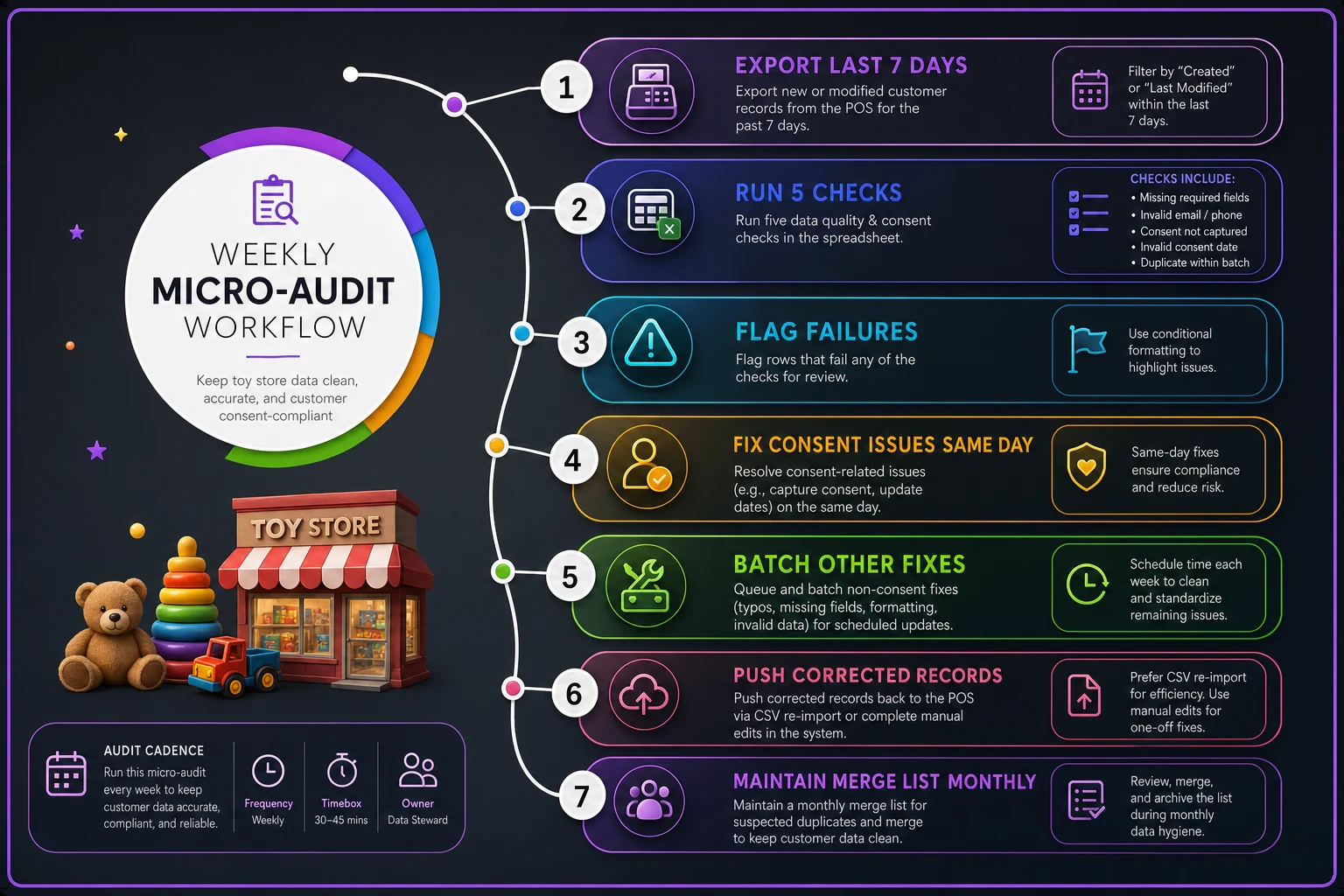
They started a Monday micro-audit — 15 to 20 minutes, five checks, flag and fix. The process looked roughly like this:
-
Export the last 7 days of new or modified records from Lightspeed
-
Run the five formula checks in a spreadsheet
-
Flag rows that failed any check
-
Fix consent issues same day, batch everything else
-
Push corrected records back via CSV re-import or manual POS edits
-
Drop any "suspected dupe" notes from staff into a monthly merge list
Here's a quick visual of that weekly micro-audit workflow.
Over about two months the unusable birthday count dropped from a few hundred flagged records to under 40, and the next promo went to close to the full eligible list. No CRM purchase, no migration. Just a weekly export, a spreadsheet with five formula columns, and a laminated card at the register.
The point
Clean customer data in retail isn't a tools problem first — it's a cadence problem. The stores with the messiest lists aren't the ones without a CRM. They're the ones who never look at the data until they need it, by which point it's too late to fix cleanly.
Twenty minutes a week, five checks, a couple of correction scripts, and three rules taped to the register. That's a data-hygiene system a one-person marketing team can actually run. Fix the entry moment when you can, audit the leaks weekly until then, and your birthday club, your consent list, and your segments stay accurate without ever touching a database migration.
Twenty minutes a week, five checks, a couple of correction scripts, and three rules taped to the register. That's a data-hygiene system a one-person marketing team can actually run. Fix the entry moment when you can, audit the leaks weekly until then, and your birthday club, your consent list, and your segments stay accurate without ever touching a database migration.
Ready to elevate your toy store operations?
Join 500+ toy retailers using GoToyvio to increase sales, reduce stockouts, and enhance customer loyalty.