


Walk into most toy stores and you'll find age labels everywhere—shelf tags showing "3-5 years," product boxes marked "Ages 8+," and endzone displays promoting "Perfect for Toddlers." Yet returns data tells a different story. Age-inappropriate purchases drive roughly one in five toy returns, costing stores both margin and customer trust.
The real killer? These returns cluster around birthdays and holidays, when stores need smooth operations most. A grandmother buying for a 4-year-old nephew she rarely sees, parents shopping for their kid's friend's party, relatives grabbing last-minute gifts—these shoppers depend entirely on your age merchandising system to guide them. When that system fails, you're looking at returned inventory during peak season, disappointed customers, and operational chaos.
Why standard age labeling creates operational nightmares
Most toy stores inherit their age-range merchandising approach from suppliers and never question it. Manufacturers slap age ranges on boxes based on safety testing requirements, not actual play patterns. Distributors organize catalogs by brand, not developmental stage. Store systems default to alphabetical or category sorting.
The result? A merchandising system that technically displays age information but functionally confuses customers at every turn.
A LEGO set marked "Ages 7-12" sits next to a simpler building block set labeled "3+" on the same shelf. A shopper sees both, assumes they're comparable difficulty since they're shelved together, and grabs the LEGO for their 5-year-old's birthday. Three days later, that frustrated parent returns the set after watching their child struggle with instructions meant for older kids.
This happens because most stores treat age labeling as a compliance checkbox rather than an operational system. They display the manufacturer's age range without considering how customers actually shop or how products actually get used.
The cascade effect of age confusion on operations
When customers can't quickly identify age-appropriate products, it triggers a cascade of operational problems that extend far beyond simple returns.
Never run out of bestsellers again.
GoToyvio helps you monitor inventory and sales to keep your shelves stocked and customers happy.
- Real-time stock tracking
- Automated reorder alerts
- Sales and promotion analytics
No credit card required
First comes the staff burden. Floor employees spend excessive time answering "is this good for a 6-year-old?" questions instead of completing other tasks. During holiday rush, these interruptions can occupy 30-40% of staff time.
A toy store manager in Denver tracked employee interactions over a December weekend and found their team answered around 150 age-related questions—roughly once every eight minutes during peak hours.
Then there's the inventory distortion. Products get returned not because they're defective but because they're developmentally wrong. This creates false demand signals in your inventory system. You might see strong initial sales for a complex science kit, reorder based on that velocity, then watch returns pile up as customers realize it's too advanced for the kids they bought it for.
The online-offline disconnect makes things worse. Your e-commerce site might have robust age filters that let customers sort by specific ages, but if your physical store doesn't mirror that logic, you're training customers to shop differently in each channel. A parent who successfully uses your "Ages 4-6" filter online arrives in-store expecting similar organization, only to find products scattered across departments based on category rather than age.
Customer trust erodes quickly when age guidance fails. Parents remember which stores led them astray. They start shopping elsewhere for gifts, especially for kids they don't know well.
Building an age-tag taxonomy that actually works
Creating effective age-range merchandising for toys starts with acknowledging that manufacturer age ranges serve a different purpose than retail age guidance. Safety testing determines whether a 3-year-old might choke on small parts. Play pattern analysis determines whether that same 3-year-old will actually enjoy and engage with the toy.
Start by establishing your own internal age taxonomy based on developmental play stages rather than arbitrary number ranges. Instead of relying solely on "3-5 years" labels, create categories that reflect how kids actually play:
Pre-verbal exploration (0-18 months): Sensory toys, cause-and-effect items, soft manipulatives
Early imaginative play (18-36 months): Simple role play, basic building, parallel play items
Collaborative discovery (3-5 years): Group games, creative building, narrative play
Rule-based challenges (5-8 years): Strategy games, complex building, competitive play
Independent mastery (8-12 years): Advanced construction, hobby kits, skill development
This becomes your rosetta stone for translating manufacturer ranges into customer-useful information. When a product arrives marked "Ages 4+," you evaluate its actual play pattern and assign it to the appropriate developmental category.
Here's a simple workflow to assign developmental categories to products.
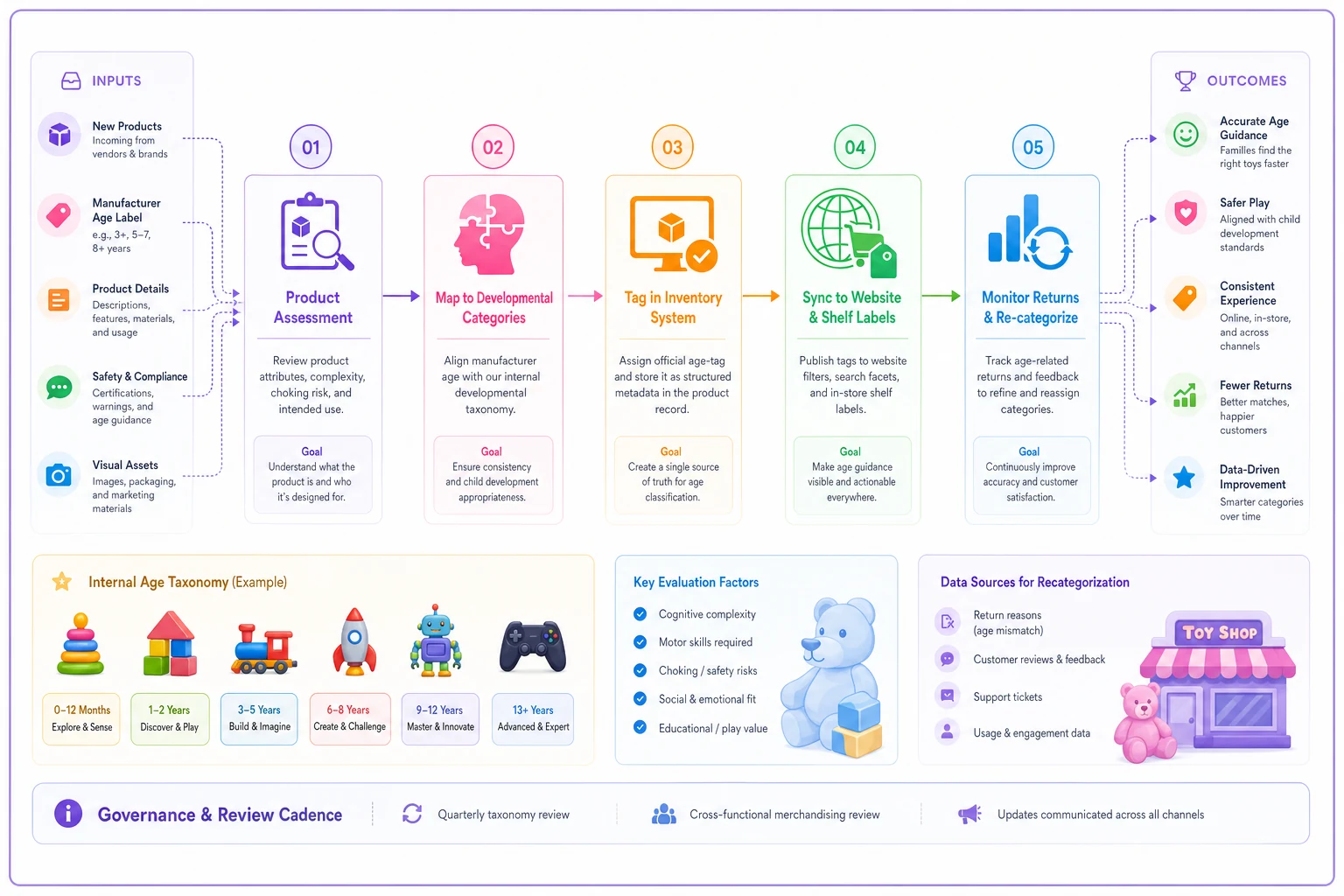
When a product arrives marked "Ages 4+," you evaluate its actual play pattern and assign it to the appropriate developmental category.
Creating visual merchandising that guides without overwhelming
Once you establish your age taxonomy, the visual execution determines whether customers actually use it. The most sophisticated categorization system fails if shoppers can't quickly parse the information while managing excited kids and mental gift lists.
Physical signage needs immediate clarity. Large, color-coded shelf talkers that display both age range and developmental stage work better than small text labels. A bright green "GREAT FOR 3-5 YEARS - Creative Builders" header sign instantly orients shoppers compared to tiny "Ages 3+" stickers on individual products.
Consider the sight lines of different shoppers. Grandparents shopping for grandchildren often struggle with small text on low shelves. Parents with strollers view displays from different angles than adults shopping alone. Your age signage needs visibility from multiple perspectives and distances.
Department organization should follow age progression when possible. Rather than grouping all building toys together regardless of complexity, create age-based zones within categories. The building toy section might flow from simple stacking cups for toddlers on the left to complex technical sets for older kids on the right.
Avoid the trap of over-segmentation though. One store outside Cleveland tried creating 12 different age zones with rigid boundaries. Customers found it more confusing than helpful, especially for kids who played above or below typical age levels. The sweet spot usually sits around 4-5 broad developmental zones with some overlap between them.
Syncing online filters with physical reality
The disconnect between online and in-store age systems creates massive operational friction. Customers research online, build expectations, then arrive in-store to find completely different organization.
Your e-commerce age filters should map directly to your physical store taxonomy. If your website offers filtering by "Preschool (3-5 years)," that exact same category should exist in-store with consistent products. This seems obvious but requires deliberate coordination between teams that often operate in silos.
Product tagging rules need strict governance to maintain consistency. Every item should carry both a specific age range (manufacturer's recommendation) and a developmental category (your taxonomy). Your POS system, website, and shelf tags all pull from this single source of truth.
Here's a practical tagging structure that works:
| Product Attribute | Example Value | Where It Appears |
|---|---|---|
| Manufacturer Age | 4+ | Product page, safety info |
| Store Age Range | 3-5 years | Shelf tags, main filters |
| Development Stage | Creative Builders | Department signs, browse categories |
| Skill Tags | Fine motor, problem-solving | Online filters, staff guides |
| Difficulty Level | Medium | Quick reference, gift guides |
This multi-layer approach gives different stakeholders the information they need. Safety-conscious parents see manufacturer guidelines. Gift buyers use broad age ranges. Educators and therapists can filter by specific skills.
Training staff to prevent age-mismatch sales
Even the best merchandising system needs human interpretation. Staff members become the final filter preventing age-inappropriate purchases, but only if they understand the why behind the system.
Most training focuses on where things are located rather than why they're appropriate for certain ages. This creates staff who can find products but can't guide selection. A better approach teaches developmental markers that help employees make informed recommendations.
Instead of memorizing that magnetic tiles are for "ages 3+," staff should understand that 3-year-olds are developing spatial reasoning and can handle larger pieces but might struggle with complex structural engineering. This knowledge helps them guide a customer toward basic magnetic squares rather than advanced sets with weird angles and small connectors.
Create quick reference guides that live at point-of-sale stations. Not lengthy manuals, but simple charts showing common gift-giving scenarios:
"Buying for a child you don't know well?"
-
Choose middle of age range, not edges
-
Opt for creative over competitive
-
Consider consumables (art supplies, building pieces)
"Child plays above age level?"
-
Look one stage up, but check piece size
-
Verify reading requirements
-
Consider sets that grow with skill
"Multiple children, different ages?"
-
Find overlap in development stages
-
Choose cooperative over competitive
-
Consider quantity over complexity
Use short role-play scenarios during training to practice recommending by developmental markers rather than age labels.
These guides transform staff from product-finders into solution-providers, reducing both returns and customer frustration.
Tracking what actually drives returns
Returns data usually gets bucketed into broad categories—defective, not as described, changed mind. But age-related returns hide within these categories unless you specifically track them. Adding a simple "age-inappropriate" option to your returns process reveals patterns that standard reporting misses.
A toy store in Austin started tracking age-mismatch returns separately and discovered that most happened with products that had ambiguous age ranges (like "3+" with no upper limit) and products shelved outside their primary age zone. They reorganized just those problem products and saw age-related returns drop significantly the following quarter.
Track not just what gets returned, but who's returning it and when. Gift purchases show different patterns than parent purchases. Grandparent returns spike after birthdays. Online orders have higher age-mismatch rates than in-store purchases where staff can intervene.
Some patterns that typically emerge:
-
Products with the widest age ranges (like "3-12 years") generate the most confusion. Customers assume anything within that range works, not realizing the vast developmental difference between a 3-year-old and a 12-year-old.
-
Cross-category confusion causes problems. A craft kit in the art section might be perfect for 8-year-olds, while a seemingly similar kit in the party favor section targets 5-year-olds. Customers don't expect age variation within what looks like the same product type.
-
Licensed character products confuse age-appropriateness most. A 3-year-old might love Spiderman, but that doesn't mean every Spiderman product suits their development level. Character licensing crosses age ranges in ways that confuse gift buyers.
Licensed character products confuse age-appropriateness most. A 3-year-old might love Spiderman, but that doesn't mean every Spiderman product suits their development level. Character licensing crosses age ranges in ways that confuse gift buyers.
When to break your own age rules
Rigid age merchandising sometimes works against you. Certain situations call for deliberate flexibility in how you present age information.
Special needs children often play with toys outside typical age ranges. A 10-year-old with developmental delays might need products typically marketed to 5-year-olds. Prominent age labeling can embarrass parents in these situations. Consider creating a "Skills Development" section that organizes by ability rather than age, allowing dignified shopping for families with special circumstances.
Collector items blur age lines completely. A LEGO Architecture set might say "16+" but adult collectors and skilled 12-year-olds both buy them. These products need different merchandising logic that emphasizes complexity and interest rather than developmental age.
Nostalgia purchases follow their own rules. Parents buying toys they loved as kids often ignore age guidelines, wanting to share experiences with children who might be slightly young for the product. Instead of fighting this tendency, create "Grow With Me" displays that acknowledge products kids will grow into.
Educational buyers need different information than typical consumers. Teachers buying for classrooms care more about curriculum alignment than age ranges. Homeschool parents want skill progression information.
The technology layer that makes age merchandising scalable
Manual age merchandising works for small inventories but breaks down as product selection grows. A store with thousands of SKUs can't reasonably maintain consistent age information across channels without systematic support.
This is where operational software becomes essential. Not fancy AI for the sake of AI, but practical automation that maintains consistency across touchpoints. When someone updates a product's age classification in your inventory system, that change should automatically flow to your website filters, generate updated shelf tags, and flag any merchandising conflicts.
For example, if you mark a product as "Creative Builders (3-5 years)" but it's currently shelved in your "Independent Mastery (8-12 years)" section, the system should alert you to the discrepancy. These systematic checks prevent the gradual entropy that degrades merchandising systems over time.
AI-powered platforms can analyze your returns data to identify products consistently purchased for the wrong age groups. Instead of waiting for patterns to become obvious, the system flags problems early. A science kit that keeps getting returned by parents of 5-year-olds, despite being marked "5+," might need recategorization to "7+" based on actual use patterns.
The operational software can also help with seasonal planning. By analyzing previous years' age-related returns around holidays and birthdays, you can proactively adjust merchandising before peak periods. Maybe certain products need clearer age signage during gift-buying seasons. Maybe others should be temporarily moved to prevent confusion.
Automation handles the mundane maintenance that usually gets skipped during busy periods. Checking that online filters match physical locations. Ensuring new products get properly categorized before hitting the floor. Generating age-appropriate product suggestions for staff to reference during customer interactions.
Making age guides customer-facing without overwhelming
The ultimate test of age-range merchandising isn't whether products are labeled correctly, but whether customers can confidently self-select appropriate items. This requires customer-facing guides that inform without overwhelming.
Physical store guides work best when they're discoverable but not intrusive. A laminated age-selection guide at the store entrance helps orient shoppers without cluttering product displays. These guides should be visual, showing typical toys for each age group rather than listing developmental milestones parents won't read.
QR codes on shelf tags can link to detailed age information without cluttering physical signage. A grandparent unsure about a purchase can scan for more guidance while confident shoppers ignore them entirely. The digital guides can include video demonstrations showing kids actually playing with products, which communicates age-appropriateness better than text descriptions.
Gift guides organized by age and interest create natural selection tools. Instead of expecting customers to evaluate individual products, curate collections like "Perfect for 5-Year-Old Dinosaur Lovers" or "STEM Gifts for 8-Year-Olds." These guides reduce decision paralysis while ensuring age-appropriate selection.
Online, your age guides need different formatting than physical stores. Website visitors have more time to browse and compare. They're often researching before purchasing, not making snap decisions with kids tugging at their legs.
Interactive gift finders that ask progressive questions work better than static lists. Start with age, then narrow by interests, then by price range. This guided selection process mirrors how knowledgeable staff would help in-store, but scales infinitely online.
Measuring success beyond return rates
While reduced returns provide the clearest metric for age-merchandising success, other operational improvements matter just as much.
Staff efficiency improves when employees spend less time explaining age appropriateness. Track questions per transaction during peak periods. A well-functioning age system should show steady decline in age-related customer questions even as new staff join for seasonal rushes.
Basket composition changes when age merchandising works properly. Customers confident in age selection often buy additional items. They're not worried about getting the wrong thing, so they add complementary products. A parent who easily finds an age-appropriate main gift might add books, puzzles, or art supplies from the same age zone.
Gift purchase frequency increases when customers trust your age guidance. Track customers who primarily buy gifts versus those buying for their own children. The gift-buyer segment should grow as word spreads that your store makes selection easy.
Online engagement metrics reveal whether your age taxonomy resonates. Time spent on age-filtered pages, click-through rates on age-based recommendations, and use of age-selection tools all indicate whether customers find the system helpful or confusing.
Common pitfalls that break age merchandising systems
Even well-designed systems degrade without active maintenance. Here are the failure patterns that consistently emerge:
Inventory creep: New products arrive and get shelved wherever space exists, gradually scrambling your age organization. That "quick fix" during holiday rush becomes permanent, and suddenly your toddler section contains products for 7-year-olds.
Filter proliferation: Online teams keep adding age filters to satisfy edge cases. What started as 5 age groups becomes 15 slightly different options that confuse rather than clarify.
Inconsistent training: Seasonal staff learn different rules than permanent employees. Morning shift tells customers one thing, evening shift says another. Without consistent training, your human element undermines your systematic approach.
Supplier pressure: Manufacturers want their products displayed together for brand impact. They push for brand blocks that mix age ranges. You accommodate to maintain relationships, but customers suffer from the confusion.
The expertise trap: Experienced staff stop relying on the system because they "just know" what works for different ages. They give great advice but don't maintain the systematic organization that helps customers self-serve.
Analysis paralysis: You track so many age-related metrics that no one knows which matter. Reports pile up unread while actual problems go unaddressed.
Building operational excellence that scales
Most toy stores treat age labeling as a necessary evil—something required for safety compliance that customers occasionally reference. But stores seeing the best results don't just label products by age. They build comprehensive systems that align physical merchandising, online filters, staff training, and customer guides around a consistent age taxonomy.
They recognize that grandparents, gift-buyers, and occasional shoppers represent a significant chunk of their revenue. These customers need more guidance than parents shopping for their own kids. When your age merchandising system works properly, you capture more of the profitable gift-giving market while reducing the operational burden of returns and confused customers.
The investment in systematic age merchandising pays off quickly. Reduced returns, improved staff efficiency, higher gift sales, and better customer satisfaction all flow from getting this basic system right. And once you have the foundation in place, AI-powered operational software can maintain and optimize it automatically, freeing up your team to focus on customer experience instead of constant manual adjustments.
The investment in systematic age merchandising pays off quickly. Reduced returns, improved staff efficiency, higher gift sales, and better customer satisfaction all flow from getting this basic system right. And once you have the foundation in place, AI-powered operational software can maintain and optimize it automatically, freeing up your team to focus on customer experience instead of constant manual adjustments.
Ready to elevate your toy store operations?
Join 500+ toy retailers using GoToyvio to increase sales, reduce stockouts, and enhance customer loyalty.